Getting started
LeadPass qualifies your leads by voice before they reach your calendar or your sales team: a lead answers your flow's questions out loud, the AI weighs the answers against your criteria, and you get a verdict — Pass, Review, or No pass — with the evidence behind it. This page walks the whole path from zero: create an account, have your first flow built from a plain-language brief, test it, share the link, and read your first verdict.
Create your account
Signing up starts where your leads will: inside a flow. The Try it yourself buttons on the LeadPass site — and /register itself — open LeadPass's own qualification flow, so the first thing you do is answer a few questions by voice, exactly the way your leads will. Answer like the lead you'd want to receive: a qualifying result hands you the Start your free trial button that opens the account form. (Joining an existing team or workspace instead? Your invitation link takes you straight to the form — no flow.)
The form asks for your name, your email and password, and one field worth a moment's thought: Business or project name. It becomes your workspace's name — the brand your leads see on the answering page. It's optional (left blank, your own name is used) and you can change it any time in Settings → Workspace (/app/settings/workspace).
After signup you pick a plan and start with a free trial — your saved payment method is only charged when the trial ends. Plans and pricing live on useleadpass.com.
Build your first flow
Open Flows → New flow (/app/flows/create). There is no question editor to fight with at this point — you write a brief and LeadPass works out what to ask and how to decide:
- Tell us about your business and the calls you want. What you sell, who it helps, which leads are worth your time, and which calls you want to avoid — written however you like. Stuck on a blank page? Use an example pre-fills a complete brief you edit into your own facts, and Copy a prompt for your AI gives you a prompt to paste into your own AI assistant so it drafts the brief from your website, notes, or call stories.
- What should happen when someone is a good fit? Name the step you're protecting — "A sales call with our team", "A product demo" — and optionally add a next-step link so leads who pass can open it the moment they finish.
- Language. A flow is born speaking your workspace's language; the Advanced section lets you pick English or Spanish per flow. This is the language your leads see.
Click Generate my flow. The build runs in the background — usually under a minute, and you can leave the page; it will be ready when you come back. If a build doesn't finish, your brief is saved and one click retries it.
One boundary to know: LeadPass builds sales-qualification flows. It can qualify buyers in regulated sectors, but it will not build flows that make decisions about patients, candidates or applicants, or that collect sensitive personal data — a brief that crosses that line is returned to you for review instead of being built.
What the builder hands you
A complete flow: the questions your leads answer out loud, the checks the AI files evidence into, and the messages leads see at the end. A Check these before sharing card on top lists anything the builder assumed or adjusted so you can confirm it, and Your brief stays attached to the flow — refine it and regenerate whenever you want (regenerating rebuilds only the questions and checks; your name, link, outcomes, and existing leads stay unchanged).
Everything is editable across four tabs: Build (questions and checks), Outcome (what each verdict tier sees), Settings, and Test.
Test it before you share
On the flow's Test tab, Test-drive by voice opens your own flow exactly as a lead sees it — real transcription, real engine, real verdict. Test runs never count toward your quota or your leads, they work even on draft flows, and their recordings are deleted after 30 days. Your past test-drives stay listed on the tab so you can re-open a result and compare after a change.
Share the link
Every flow has one public URL, shown right under the flow's name in the editor with a copy button:
https://useleadpass.com/your-workspace/your-flow
The ending is yours to edit. A flow built from a brief goes live at its link as soon as the build finishes. The Open/Closed selector in the editor's header closes the link at any moment, and the flow's Settings can cap how many answers it accepts or set an Open until end time — after which visitors see a polite closed card instead of the questions.
Put the link wherever your leads already are: your website, ad campaigns, email signature, or the confirmation page of an existing form.
What your first lead experiences
- Your brand, not ours. The answering page shows your workspace name or logo, your welcome message, and optionally a team member's name, role, and photo.
- The contact fields you chose — name, email, company, phone; each one hidden, optional, or required per flow.
- One question at a time, answered out loud. A progress bar tracks the questions; each answer can run up to 10 minutes, and the lead can listen back and re-record before sending.
- Possibly one quick follow-up. When an answer leaves something genuinely unclear, the lead gets a short clarification round based on what they said.
- A short wait, then their response. The page updates itself while answers are transcribed and evaluated, then shows the message and next step you configured for their outcome — including your next-step button if you added a link. The lead never sees a verdict label.
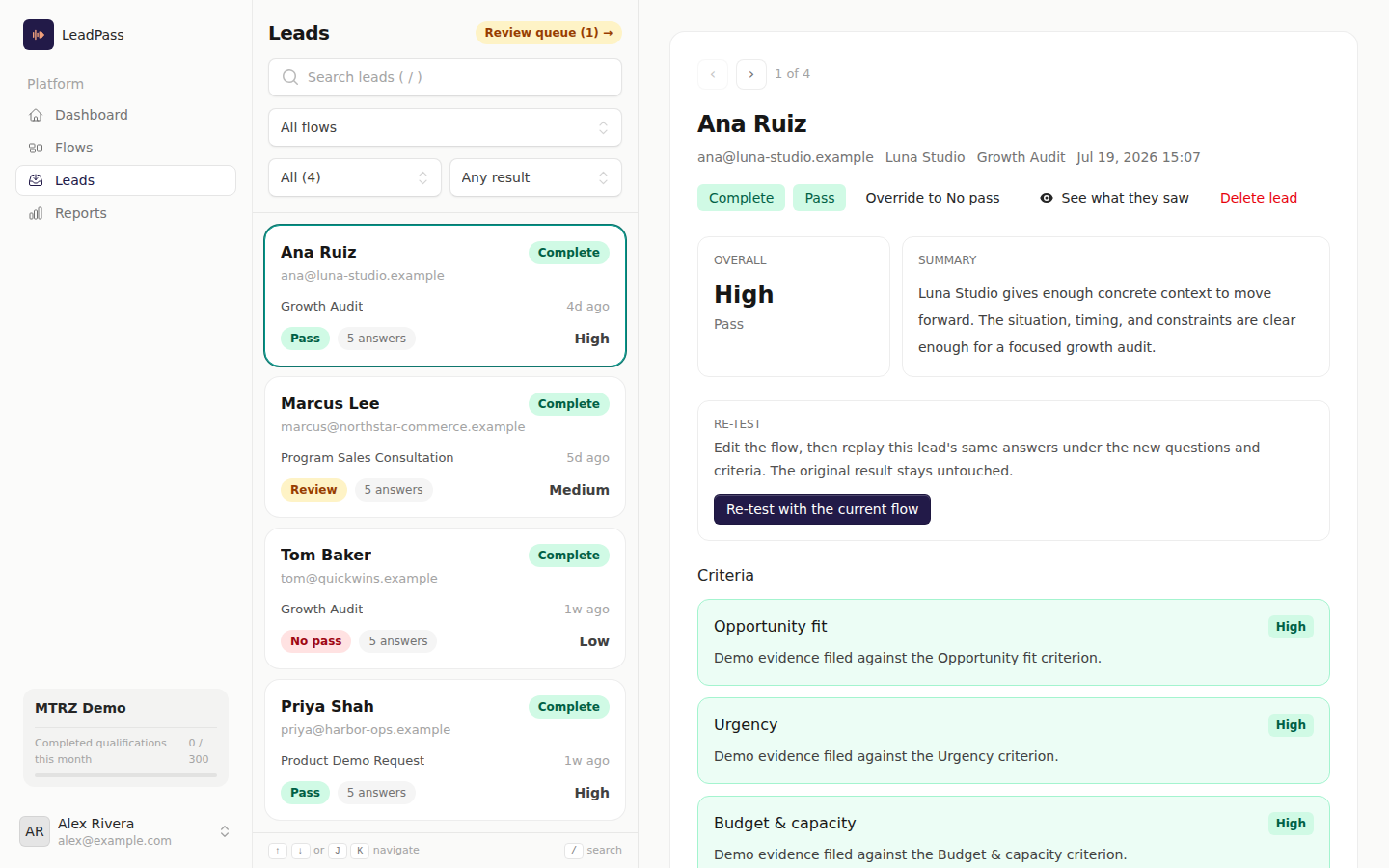
Where the verdict lands
| Surface | What you get |
|---|---|
Leads (/app/leads) |
Every lead with its verdict — Pass, Review, No pass, or Incomplete — filterable by flow, status, and verdict. Open a lead to see the summary, each check's read with the lead's own words as evidence, and the full transcripts and recordings. |
Review queue (/app/leads/review) |
Leads that need a human call wait here; decide Pass or No pass and they move on. |
| Your own systems | Connect a webhook and every verdict lands in your CRM, Slack, or automation platform seconds after the lead finishes talking. |
That's the loop: brief in, flow out, link shared, verdicts landing where your team already works.