Billing and plans
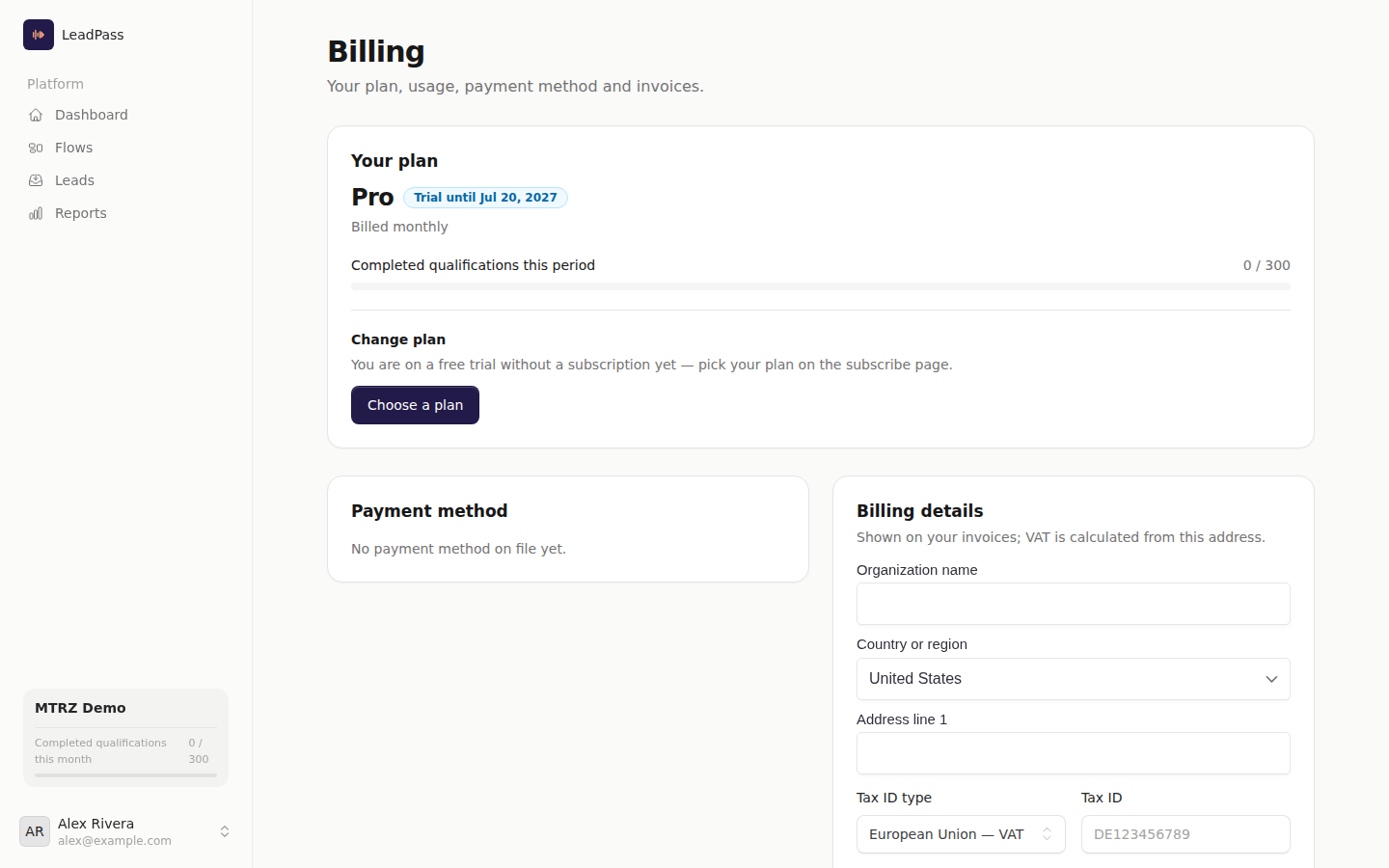
Everything about your subscription lives in one place: Billing (/app/billing). That is where you see your plan and its status, watch your usage against your included limits, change plan, update your payment method, keep your fiscal details current, and download invoices. Billing belongs to the account owner — teammates can use the product, but only the owner can change the plan, the payment method, or see invoices.
Current plans and prices are on the pricing section of the homepage and, for agencies, on the agencies page. Every plan is priced in euros or US dollars — the same figure in either currency ($49 and €49 buy the same plan). Your account's currency is set when you sign up, based on your country — euros in Europe, US dollars everywhere else — and can be changed at checkout until your first subscription starts.
The free trial
Every plan starts with a 14-day free trial. You pick a plan, save a payment method at checkout, and pay €0 today (or $0, if your account is billed in dollars) — your card is charged only when the trial ends. Cancel any time during the trial and you will not be charged.
A few things to know:
- Trial limits. During the trial your account runs on a trial-sized allowance: parts of your plan (like flows and completed qualifications) are capped until your first payment. The exact trial allowance is shown on the checkout page and on your Billing page while the trial runs; full plan limits unlock as soon as the first payment is confirmed.
- Start my plan now. If you outgrow the trial limits before day 14, the Start my plan now button on
/app/billingends the trial and collects the first payment immediately. Full limits unlock the moment the payment is confirmed. - Changing plan during the trial is free. The trial continues to its original end date, and the first charge when it ends is simply the new plan's price.
- One trial per account. If you cancel and later resubscribe, checkout charges the first period right away — a new trial is never granted.
Plans and pooled limits
A plan gives your account three allowances, and all of them are pooled across the whole account — shared by every workspace, never split per workspace:
| Allowance | What it counts | Where you see it |
|---|---|---|
| Workspaces | Workspaces in the account | Workspace creation |
| Flows | Every flow in every workspace, including drafts and closed flows | The "x of y flows" counter on /app/flows |
| Completed qualifications | Leads whose qualification completes, per month | The usage meter on /app/billing |
There are two plan tracks: direct plans (one workspace) and agency plans (multiple client workspaces, larger pooled allowances). Your account picks between plans on its own track; moving between tracks is not self-service — contact support, so client workspaces are handled properly.
Monthly vs annual
Each plan is sold monthly or annually. Annual plans are billed once per year, in one payment, at a discount — the checkout and the plan picker always state the exact recurring amount before you confirm. On an annual plan your included qualification quota still resets monthly.
Prices exclude tax: euro prices are shown + VAT, dollar prices + tax. Either way, tax is calculated from your billing address, and a validated business tax ID is reverse-charged where that applies.
Checkout
Checkout runs on Stripe at /app/billing/subscribe. You choose the plan and interval, enter your payment and billing details in Stripe's own secure fields, and confirm. Until your account has its first subscription — starting the trial already counts — the page also shows a currency switch, EUR or USD, so you can change the currency your signup country chose; every plan costs the same figure in both. From the first subscription on, the currency is fixed: renewals, plan changes and prorations all stay in it. The page always states exactly what happens today — "€0 today" (or "$0 today") with the trial, or the first period's charge without one. Add your business tax ID during checkout, or any time afterwards under Billing details on /app/billing.
Invoices and billing details
Your invoices are listed at the bottom of /app/billing. Each paid invoice links to the fiscal invoice document — that is the invoice you file, not a card receipt.
The Billing details section controls what appears on your invoices: business name, address, and tax ID. Tax is calculated from this address, so keep it current. Your saved payment method is shown in the same place, with an Update payment method button; the new card becomes the default for your subscription.
Changing plan
Open Change plan on /app/billing, pick the plan and interval, and confirm. Before anything is charged you review a confirmation stating the exact new recurring price. Then:
- On a paid subscription, the change takes effect immediately and Stripe invoices the prorated difference right away. That proration invoice can include a charge or a credit for unused time, so its total can differ from the recurring price. On an upgrade, the added monthly allowance is prorated to the days left in your cycle.
- On trial, nothing is charged — the trial continues, and the first charge at its end uses the new plan.
A downgrade is refused while your account holds more workspaces or flows than the target plan includes — remove some (or contact support to consolidate) and try again. If your subscription is set to cancel, resume it first; and if a payment is pending or failed, that has to settle before another change.
Cancelling and resuming
Cancel subscription on /app/billing stops the renewal — your subscription stays active until the end of the period you already paid for, and the page shows the exact end date. Until that date you can Resume subscription with one click and continue uninterrupted. Cancelling during the trial means you are never charged.
Once a cancelled subscription actually ends, signing in takes you to the subscribe page, and your public flow links stop accepting new leads — a lead who opens one sees a neutral "This link is closed" card, nothing about billing. Resubscribing reopens them.
When something runs out
| Situation | What happens | How to recover |
|---|---|---|
| Monthly qualification quota spent | Every flow link stops accepting new leads; leads mid-conversation still finish. The Billing meter turns red and the account owner gets one email per period. | Upgrade your plan, or wait for the monthly reset (the email states the date). |
| Flow limit reached | The counter on /app/flows turns amber on the last slot; creating another flow is refused. |
Delete a flow anywhere in the account, or upgrade. |
| Card payment fails at renewal | Your plan shows Past due. Nothing is cut off — the charge is retried automatically. | Update your payment method on /app/billing; that usually resolves it right away. |
The quota meter warns before the wall: it changes color as the monthly quota runs low, so hitting the limit is never a surprise.